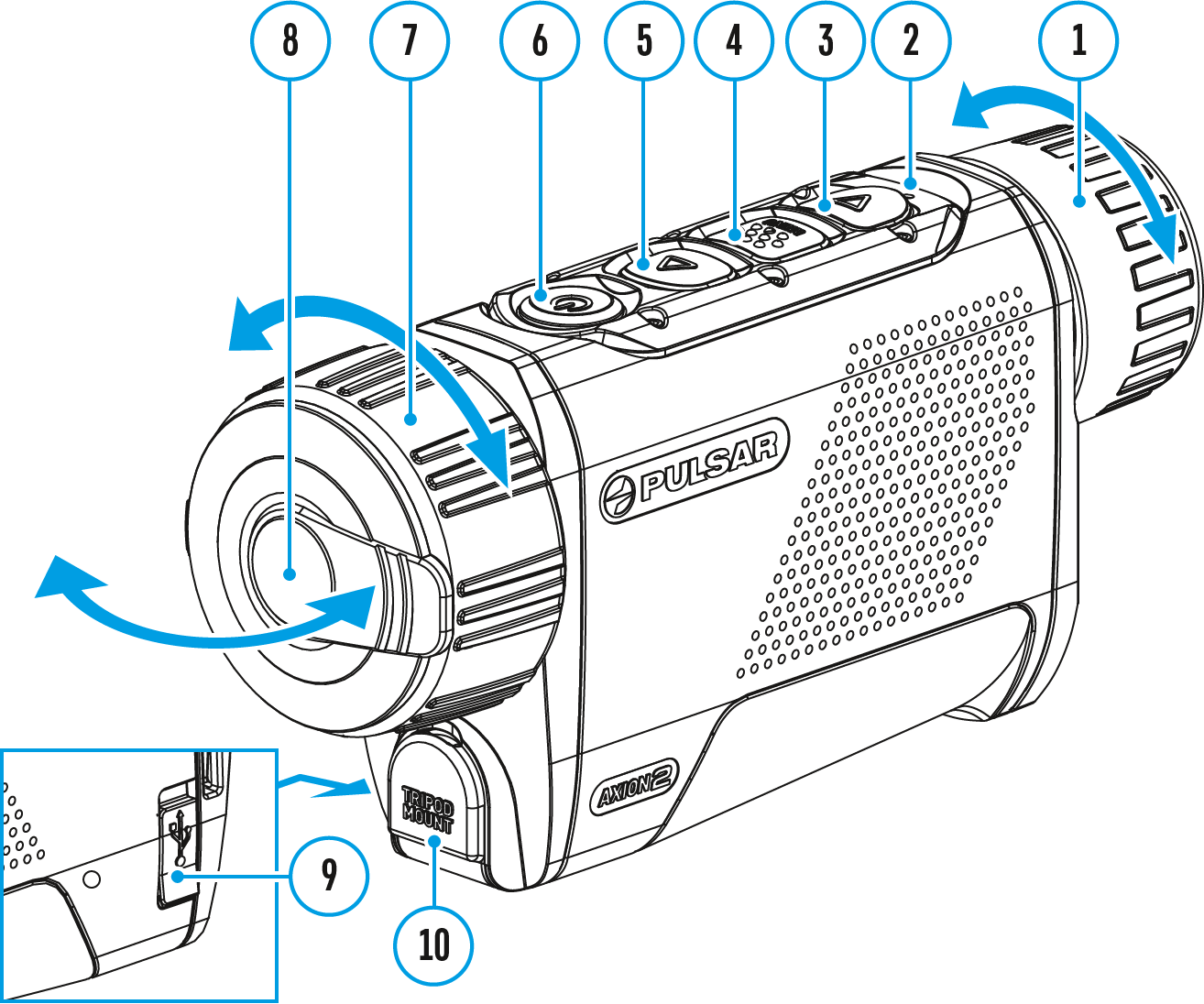
The basic settings (adjusting brightness and contrast, using the Stadiametric Rangefinder function) can be changed using the quick access menu.
- Enter the menu by briefly pressing the MENU (4).
- A short press of the МENU (4) button enables you to toggle between functions, as described below.

Brightness  – press the UP (5)/DOWN (3) buttons to change display brightness from 0 to 20.
Contrast  – press the UP (5)/DOWN (3) buttons to change image contrast from 0 to 20.
Note: display brightness and contrast settings are saved in the memory when the device is turned off.
Stadiometric Rangefinder  - change the position of special marker lines to determine the distance to the object being observed by pressing the UP (5)/DOWN (3) buttons (for more details see the Stadiametric Rangefinder section).
Smooth Digital Zoom  – press the UP (5)/DOWN (3) button to change the value of the digital zoom from 2 to 8. The digital zoom changes in 0.1 increments.
- Press and hold the MENU (4) button to exit the menu or wait for 10 seconds to exit automatically.
 English
 German
 French
 Spanish
 Italiano
 English
 Lietuvių